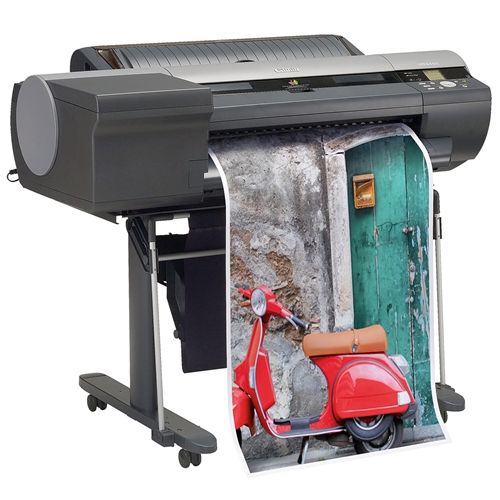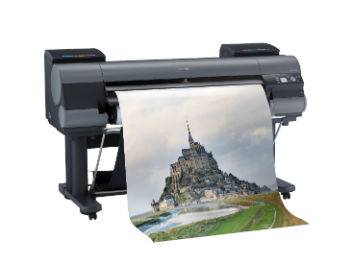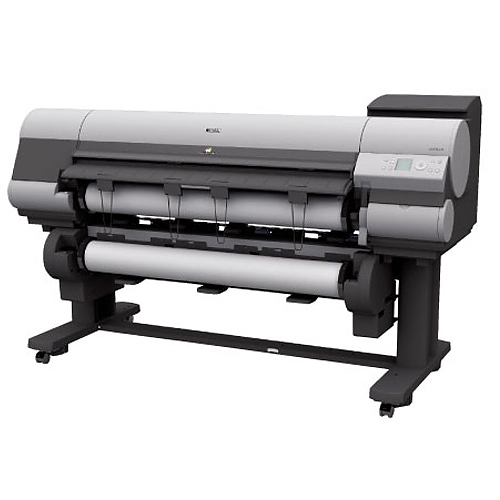

- 60-inch Large Format Printer
- 8-Color LUCIA EX Ink Set
- Borderless printing up to 60″
- Multi-sensor for color density detection
- Fast Economy Printing
Canon imagePROGRAF iPF9400S 60″ Wide Format Printer
$9,995.00
Out of stock
-
Description
Product Description
imagePROGRAF iPF9400S Overview
An extremely versatile solution, the 60″ imagePROGRAF iPF9400S printer is ideal for those who need quality large format output and maximum productivity. Built for the photography, proofing and production markets, the iPF9400S printer delivers high quality imaging while increasing overall productivity. An incredibly large color spectrum is produced by the 8-Color LUCIA EX pigment ink set, which also provides better scratch resistance and smoother gradations. The new Multi-sensor included with this printer provides improved color density detection and allows for a full calibration to be completed within 15 minutes, with the ability to use non-Canon branded media. Borderless printing of up to 60” is now possible with this printer and the new economy print mode allows for quality printing with limited ink usage. In highest print mode, the order of ink application and layering is optimized to maintain the highest print quality with fewer passes, making this mode twice as fast compared to previous models. Ideal for production grade printing environments, the iPF9400S is up to 40% faster than the 12-Color line of imagePROGRAF Graphic Arts printers. Achieve maximum productivity with large 330ml or 700ml ink tanks and a unique sub-ink tank system for replacing ink on-the-fly without stopping the printer. The iPF9400S is also equipped with a large 250GB hard drive, geared to increase productivity in high volume printing and streamlined workflows, while allowing for faster processing of large files as well as the ability to reprint jobs directly from the printer.
Download the brochure: Brochure
To expand printing options and capabilities, the iPF9400S printer comes bundled with an assortment of Software Solutions such as an Accounting Manager which tracks printing costs and a Print Plug-in for Microsoft Office. The enhanced Print Plug-in for Adobe Photoshop includes a new Adjustment Pattern Setting which allows for multiples of an image to be printed at once with different color values implemented and displayed. The iPF9400S has the ability to print on many types of substrates including glossy, vinyl, recycled and chlorine free media to meet the needs of a variety of applications. To improve versatility, the iPF9400S has a media configuration tool which allows customers to not only utilize existing Canon-branded media, but also with third party media. By combining Canon’s technological achievements, the iPF9400S is an excellent solution for portraits, advertisements, retail signage and contract proofs.
ipf9400 Features
- LUCIA EX Ink Set
Canon’s LUCIA EX Ink set is designed for dramatic photographic expression and detailed color reproduction for exacting proofing applications. This 8-Color ink set offers a brilliant range of vibrant colors, smooth gradations and transitions, with incredibly fine details. This specially formulated ink also offers better scratch resistance, superb black reproduction and exceptional color stability compared to its predecessor. Vibrant, rich colors with unsurpassed detail and crisp, clean monotone images make this ink set essential for incredible photo quality output. - New Multi-Sensor
This new printer includes an upgraded, built-in color densitometer that’s designed to offer even more precise calibration and color matching. Using a three-color LED and a newly developed condenser lens the sensor enables accurate recalibration of the device, allowing users to maintain a low average printer-to-printer color difference. Automatic color calibration is finished quickly after a few simple steps on the printer’s operation panel. A single color calibration performed with one type of media can be applied to media in all printing modes. - High Speed Printing with Fewer Passes
In highest print mode, the order of ink application and layering is optimized to maintain the highest print quality with fewer passes, making this mode twice as fast compared to previous models. In high and standard print modes, print density within a single pass of the heads is optimized to reduce unevenness and support fewer passes as well. - Sub Ink Tank System
Utilizing the included sub ink tanks, the iPF9400 keeps some ink in reserve so that even when the physical ink tanks run out of ink, printing can continue without interruption and the tanks can be replaced on the fly. - New Economy Printing Mode
With this new feature, the fastest printing mode on the iPF9400S offers printing quality that’s equivalent to the previous model’s standard printing mode. while finishing print jobs much faster. Ink consumption is also dramatically reduced which helps in cutting down on ink costs. - Borderless Printing
For the first time have the ability to print up to 60″ wide full borderless prints. - 250GB Hard Drive
A built-in 250GB hard drive within the printer increases productivity by relieving workload from the host PC, while providing a large capacity for print job data storage and retrieval. This 250GB hard drive enables job data to be stored in protected mailboxes for easy access via web browser or at the printer for job re-printing. The embedded hard disk is ideal for medium to large workgroups to share a printer efficiently with multiple users, offering sample job storage space. To ensure security of your files, there are is a quick erase mode, high-speed mode, and a secure erase mode which meets to U.S. Department of Defense requirements (DoD5022.22-M Compliant) for erasure of disk media. - Gigabit Ethernet Support
Fast data transfer will help exceptionally high measures of productivity. - Enhanced Print Plug-in for Adobe Photoshop
This export module allows 16-bit image processing, preserving the expanded color spectrum and high gradation of the file. The Print plug-in also reduces the possibility of incorrect settings, by providing an integrated interface for print settings in Photoshop and the printer driver, enabling efficient production.The new Adjustment Pattern Setting feature allows for multiples of an image to be printed with different color settings in order to choose the color that most closely matches what you need.The following new or enhanced features are provided in the Print Plug-In for Photoshop:- Adjustment Pattern Setting
- Adobe CMM support
- Proof printing support
- Support for commercial profile creation tools
- Media Configuration Tool
Recognizing the expanding array of media options for large format printers and to further improve the versatility of these new imagePROGRAF models, Canon has developed a Media Configuration Tool, which allows customers to not only utilize Canon-branded media, but provides the ability to make adjustments to printer settings to enhance the precision and quality of output achieved with third party media.Settings that can be configured using media parameter adjustment features include:- Media weight and thickness
- Ink drying
- Automatic cutting settings
- Borderless printing
- Paper feed amount
- Print-head height
- Vacuum strength
- Maximum ink usage
- Accounting Manager
Tracks how much ink and media is being consumed when printing. Costs can be assigned to ink and paper to determine expenses based on “Cost of Goods”. The user can also input a variable cost that will be added to the total of the print cost. The data is exportable to a .csv format for Microsoft Excel so the data can be used for billing purposes.Features include:- Job Cost (ink, Media and variable cost inputted by user)
- Ink Consumed per Job*
- Media Consumed per Job
- Job Completion time
- And more
*Ink usage is estimate, and error tolerance is ±15%
- Print Plug in for Microsoft Office
This utility makes it easy to print large-format documents created in Microsoft Word, Excel, or PowerPoint. The Plug-in appears in a tool bar inside the Microsoft application and has an easy-to-follow “Wizard”. The Plug-in will bypass the printer driver to simplify the printing process. A few simple steps convert your 8.5″ x 11″ office document to poster size. - PosterArtist (Optional)
For those with more demanding poster creation needs, Canon’s optional PosterArtist offers advanced features such as Auto Design, Variable Data, and in-application image editing features, as well as additional templates, royalty-free photos, and clip art. The built-in weblink feature in PosterArtist Lite links users directly to the PosterArtist website for useful hints and tips, and even more free contents for download.
- LUCIA EX Ink Set
-
Additional information
Additional Information
Weight 551 lbs Media width 60"
Brand Manufacturer Canon
APPLICATION Graphic Arts
MSRP 9995.00